Saturday, April 5, 2014

SELF PUBLISHING MADE EASY

 TOTALLY FREE SELF PUBLISHING ON CREATESPACE

The easiest way to self publish that I have found is with Create Space.  In an earlier post, I told you why--- now I am going to show you "How", in a few easy steps.  You pay NO fees, only for the actual books that YOU order.  The customers who order them from the sites pay for the production of their book, and you collect a royalty.  When you order, you are charged a discounted rate + shipping and handling. My 220 page book came to under $5 each INCLUDING the shipping.  Then I could sell them for $10 or more if I wanted.
--------------------------------------------------------------------------------------
Step 1 -   Sign up for a FREE account  
You have done this plenty of times!
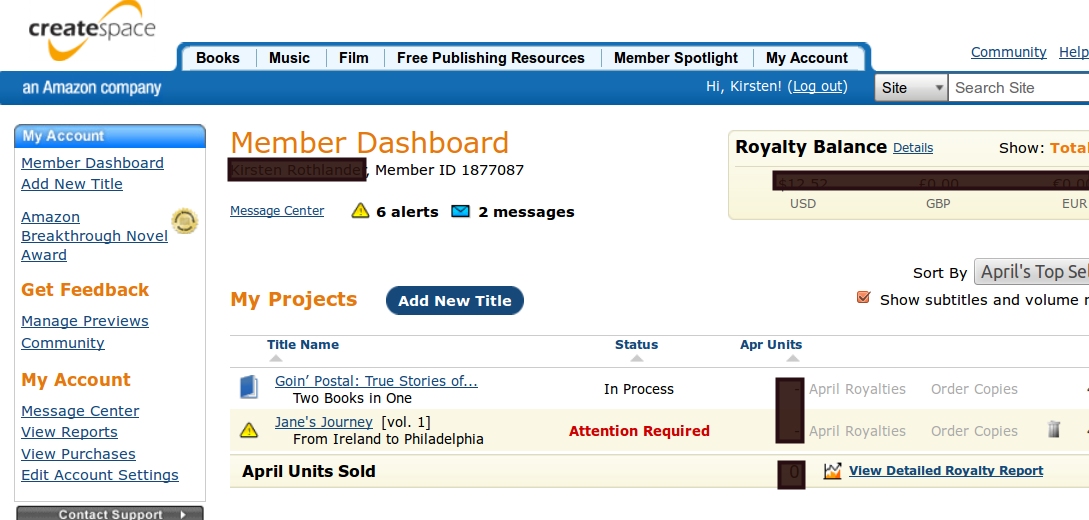
Once logged in, you will be brought to the Member Dashboard.  This keeps a record of your different projects, the number of copies sold, and your royalties that are yet to be paid.   This screen will tell you "Attention required" in Red, as it does here for "Jane's Journey".  When you click on the project, it will give you a step by step guide to fixing the problems, or which questions you need to answer.  

 ---------------------------------------------------------------------------------------------------------------------------------------------------

 Step 2 - ADD NEW TITLE
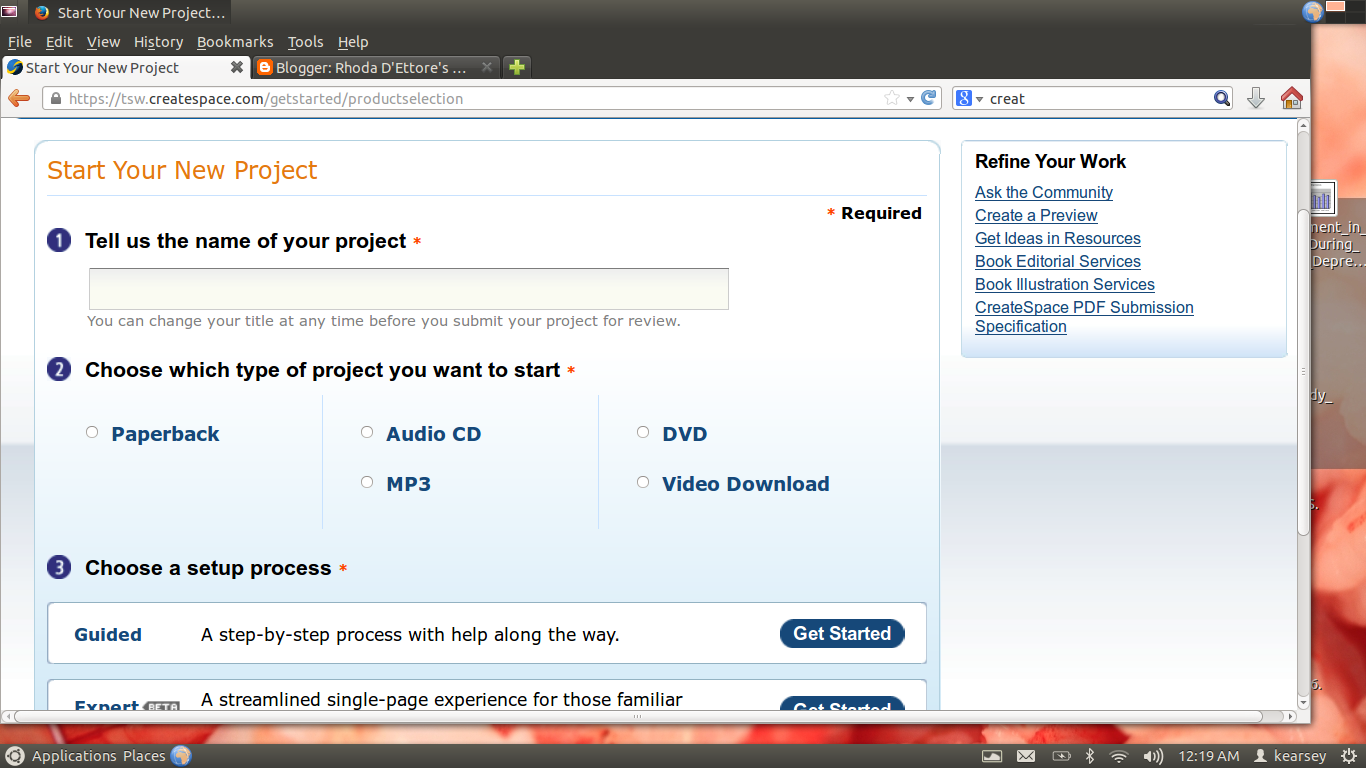
On the upper left of the dashboard above, you will see "Add New Title".
And this screen appears. You answer the typical questions: Title, Author, Series, Edition.
The next page is self explanatory as well.  Then you get to the ISBN.


-----------------------------------------------------------------------------------------------------------------------------------------------

Step 3 - ISBN 
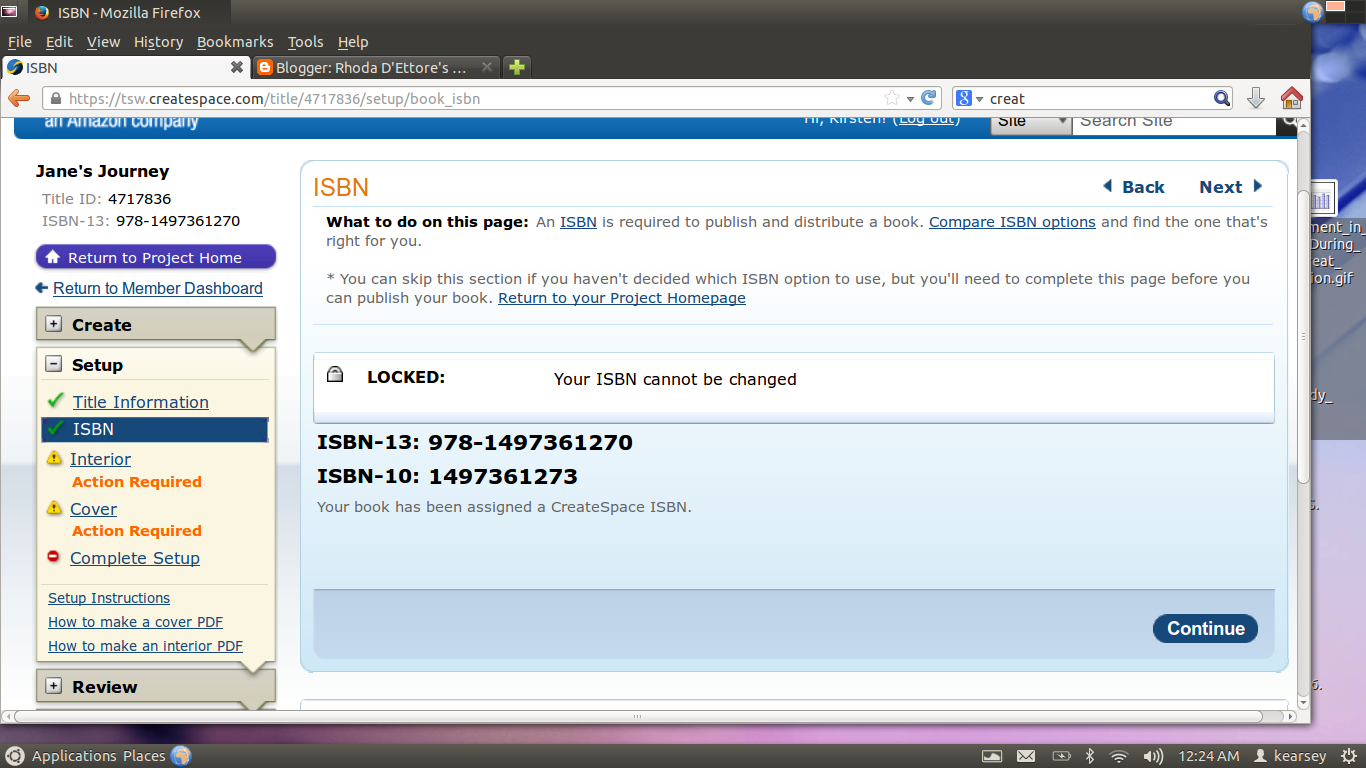
Don't be scare, overwhelmed, or tricked into paying hundreds of dollars from another site.  Although it will cost over $100 for you to purchase your own, CreateSpace, Smashwords, and others buy them in bulk and give you the option of choosing a FREE one from their site.  There are reasons why you may want your own, but we can discuss this later. If you have never published before and are strapped for cash, you might just want to start off with the FREE ones!


-----------------------------------------------------------------------------------------------------------------------------------------------------


Step 4 - Choosing your trim


 Choose whether your interior is going to be black & white or color, whether you want white paper or Cream (WARNING- ask for a sample, some people say it looks yellow, not cream), then choose the size of the book you want.  The site recommends 6x9 because various distributors have certain requirements. However, there are even custom sizes available.

_______________________________________________________________________________________

Step 5 - Upload your file


 I will discuss layout later in this post, however, I VEHEMENTLY recommend that you upload PDF files, not the .doc  that CreateSpace says it accepts.  It will save you a great deal of time.

I originally thought "What's the big deal? I uploaded the Open Office files, and Libre files.  Trust me when I tell you that the converter will add extra spaces and pages.  My 220 page book became 800, then 600, and quite a few other numbers.  I did not realize just how easy it is to save into PDF... on the word program FILE>Export as PDF> name the file and save, just like a regular file!

Once you upload the file, the automatic converter will check it for margin problems. I have yet to see it reject for anything else. BE AWARE:  This is not checking for spacing, spelling, Chapter headings to be properly located. The only thing I could see it declined was if the text ran too far out of the margins.  It has a neat program where you can turn every page and see what it looks like in book format.
____________________________________________________________________________________

Step 6 -  Design Your Cover

CreateSpace has a cover editor which allows you to design the cover yourself. You can upload your own pics, or choose one of theirs.  You then choose a theme you like, background & text colors, you can insert transparency on certain styles.  It is VERY easy.  I have very little Photoshop type of experience--- this was MUCH easier, saved a lot of time, and was a click type of step by step process.

____________________________________________________________________________________

  Step 7 - Review, Proofs, and Sales

Once you have completed the above steps, you must "Submit For Review".  Again, I only saw it reject for margins. This is supposed to be an "indepth review" that takes 24 hours from the time you submit it.  Once it is accepted, you can do two things:  View Digital Proof.  It appears in a book like form on the screen, and you can turn each page.  The other thing is ordering a physical proof.  My proof cost $4 + $1 for shipping.  You get an exact copy of what the book will look like, but it is labelled proof in the back-- not for resale.  

You then can approve the proof, and then you set the price and distributors. It will go up for sale immediately on CreateSpace Store, but take a couple days for other sites.  I think that CS does a lousy job of explaining this.  I had NO idea whatsoever that my book would go on sale on Barnes & Noble.  I seriously thought since they were the competition, that the Amazon owned CS would not put it there. My family called and told me they saw my book there.  You get a much higher royalty from the CS store, so try posting your links there first. But most of your sales will come from Amazon & B&N.

What if you don't like the book or have typos?    Then you go back to step five, upload the files, change the cover if you need to, and wait the 24 hour review period... AGAIN!. UGHHH! 

What about Kindle?
CS will convert your work into a Kindle format and make it available on Amazon if you choose.  You can then choose to join the "Kindle Direct Publishing Select" which gives you more marketing capabilities, and much higher royalties if you agree to a 3 month exclusivity contract.  If you do not opt for this, your royalties will be less, but you can post it yourself on Nook Press or Smashwords... they are free, and you sit back and collect the money. 
____________________________________________________________________________________

Royalties

You can track your sales on the Member Dashboard. Royalties are paid out depending on the different distribution channels, and each takes a certain amount of time to record and post. 
___________________________________________________________

The hardest part of the CreateSpace process is the layout.  I will discuss this in my next post, when I have more time. 

As always, thanks for reading!


Tuesday, April 1, 2014

WANT TO PUBLISH AN AUDIO BOOK?

It is recommended by some NYT Best Sellers that you publish an audio book for every book you write.  People perceive audio books to be more difficult to manufacture, therefore, having one made of your book gives both your book and your name credibility with readers.
 
 CLICK HERE FOR ACX

Amazon owned ACX now makes it easier than ever! And, you have the option of paying the Narrator/Producer an upfront negotiated flat rate, OR sharing the royalties, meaning there is no upfront costs to you!


Step 1 - Your book must be available on Amazon, either ebook or print.


Step 2 - You set up a profile for your book:  Give a description, post whether you want to pay the upfront flat rate or share royalties with the narrator, then you post an audition script.


Step 3 -  Finding a Narrator 
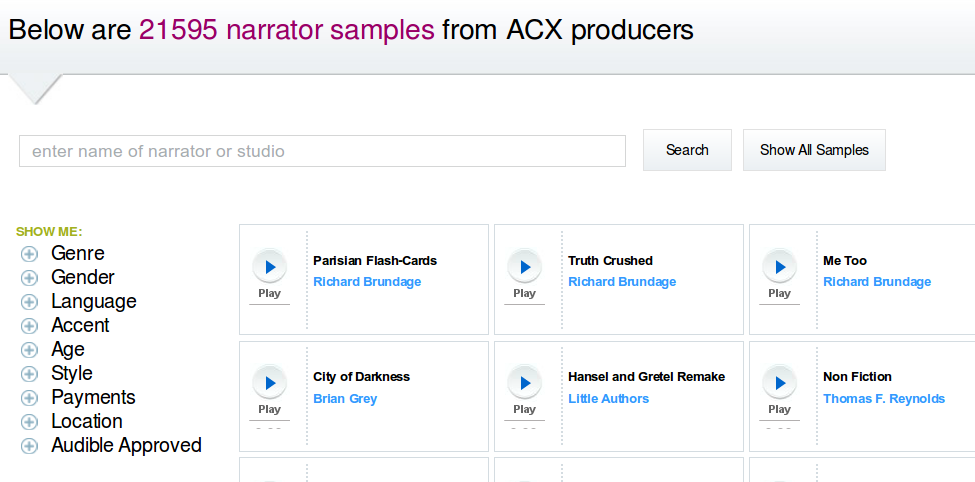
There are literally thousands of narrators with samples
on their site. You punch in the demographics you are looking for:  Age, Gender, Genre, Style (sarcastic, humorous, upbeat, sexy), the language, even the accent! 

You can message narrators after listening to their samples, and narrators can message you after you begin accepting auditions.


Step 4 -  Auditions
Once contact is made with a narrator, they have the ability to post an audition for you.  This is approximately 7 minutes to give you an idea of their abilities. You can listen to the audition as many times as you like, and you can compare the different narrators who audition.  All you need do is click the button to play.  When you make a decision as to who you want to narrate your book, you go to step 5, Make an Offer.


Step 5  - Make an Offer  -  This is the truly easy part-- You select the person you found to be the best, set a time frame for the project, and submit.  When the person accepts, you now have a Project in Production.  What is an adequate time frame? Keep in mind that they are doing all of the work.  The author's part is just to sit back and listen along the way, and approve or give feedback. So be considerate! I set both of my project deadlines at 2 weeks for the first 15 minute track, and two months for the final project. This is a binding contract, so be considerate, but keep in mind, the narrator wants to get the project done just as quickly as you do.

Step 6 - Offer Accepted! 
Upload your manuscript!   

Step 7 -  15 Minute Sample 
Once you upload the manuscript, the narrator then produces a 15 minute segment for your approval.  According to your contract, the first 15 minutes is due by the deadline you set during Step 5.  Once you listen to it, you can approve it, or give the narrator feedback to improve the quality of the finished project.  Once this is completed, You are on your way.

Step 8 - Periodic Approvals  The narrator will send you clips for periodic approvals, most likely for every chapter.  Again, feedback and approval are necessary.

Step 9  -  Final Product - It's Finished!!!  

Step 10 -  Distribution
 The audiobook then goes on sale on Amazon, iTunes, Audilbe.com, and others, depending on the options you choose.

Cover Design - Anytime
The cover of your audio book must be a perfect square, 2100 x 2100 with at least 70pi.  You as the author can work on this, while the narrator is doing their thing!

Promote the heck out of your new audio book!!!!!  

I am currently involved with having my ebook, 
"10 Shades of Blush: The Softer Side of Kink"  and my print book "Goin' Postal & The Creek" made into audiobooks.  So far the process has been simple, fun, and interesting meeting some great people!  It is an awesome way to network with the narrators, as you both make money on the quality of the product! 

Friday, March 28, 2014

COMMON WRITING MISTAKES

Word Confusion, are you guilty?

After some research, I have found that many people use the wrong word, or spell a word incorrectly.  Along with the conveniences of technology, we have also lost some skills.  Being able to click "Spell Check"  has made many of us lazy.

The most common mistake on the internet, which shocked me was:

lose  vs.   loose

This is a verb vs adjective mistake.  

Verb:          Do not lose your money.

Adjective:  Your shoe laces are loose.


One of my pet peeves that I must correct when I see it?

accept  vs  except

Verb:          The college will accept application soon.
AdjectiveShe applied to all the colleges except one.


The following I had to look up for my own writing:

towards  vs toward

They are BOTH correct, however, towards is commonly used in Britain, whereas toward is used in the US.

seperate  vs separate

seperate is not a word, to remember this, you can use the ER is similar to ERror


who vs whom

This is a biggie just because people do not use proper grammar.  Whom should be used as an object in a prepositional phrase.

To whom does this book belong?
Of whom are you speaking?

Tuesday, March 25, 2014

A MUST FOR HISTORICAL WRITERS!

Do you write historical fiction?  Do you need appropriate slang or info about certain time periods? Check out this incredible site! 

 For Writer's Dream Tools Click Here!!!

You select the decade from 1650s to the present, and you will find an incredible list of information of that decade, including slang, events, people, and other useful data to make your stories and novels more believable.

I came across this site while writing my new book The Creek: Where Stories of the Past Come Alive, which spans time from 1777 - 1990.  I found it a must have for my upcoming book, Jane's Journey, about an Irish immigrant coming to America with her toddler son in 1820.  Seeing the events that could possibly affect my characters gave me ideas to expand the stories in new directions.

INTRO TO DEBORAH JAY

I recently met an author, Deborah Jay, who will appeal to any of you fantasy fans.  

Desperate Measures
Her romantic fantasy "Desperate Measures" has been described by reviews as a steamy, fun, and and actioned packed-- which "does not rely on the sex scenes to keep one's interest".  Sounds like a winner to me!!! Be sure to check it out!


The Prince's Man
Her other Book, is being touted as keeping the reader "glued to this book for two days! WOW"  This seems to have it all, nobles, kings, revenge, fear, action, and of course, someone trying to usurp the throne!

Be sure to read more about Deborah Jay at her CLICK HERE

My debut novel, award winning fantasy The Prince’s Man was published July 2013. With over fourty 5 * reviews now, it was an Amazon Top 100 Hot New Release, and pops up often in the Epic Fantasy and Sword and Sorcery Top 100s.
Think James Bond meets Lord of the Rings - a fun, fast, action-packed story featuring a pair of mismatched spies who are struggling to save their kingdom whilst trying not to kill each other.


Saturday, March 22, 2014

NEW PRINT BOOK!

Goin' Postal & The Creek have been printed as a "Two books in One" combo!

Be sure to get your copy for $10.99

It will soon be available on Amazon


Friday, March 14, 2014

BEST SELF PUBLISHING

Do you want to get published but don't know how?  You went to the places like Author House which want a $1,500 minimum, and when all is done you could spend $10,000?  You check out places like DiggyPod that look nice and easy, but charge you a ridiculous price by the book that you make nearly no profit? 

Forget them!!!

They are not going to market and distribute your book anyway, so you are going to have to do all the work, with none of the rewards!  So what should you do?

FOR CREATESPACE CLICK HERE

Createspace is an Amazon owned printing company which you can use to self publish. There are NO upfront costs, except for the first book, you need to buy as a proof in order to grant production approval.  No lie, mine was $3 plus shipping!  I am entitled to buy as many copies as I like at that price so that I can promote sales myself.

Once you approve your book for publication, you can choose to distribute it on Amazon and other distributors, and whether you want the book converted to a kindle format!

You still own the rights to your book, so you can still have it published elsewhere.  And, it was easy to upload from a MS Word .doc.  They have some great tools that help you make a professional looking cover, and then you see a virtual proof.  Once they review the book for their requirements, they will send you a message/email saying that your book is ready for you to approve the physical book.  They give you the price of your order for one physical copy which is determined by the page numbers and trim size.  Once you receive that, you can submit your approval for printing and distribution. 

The royalties are not bad either. With my book, the royalties are between $3.50-$5 for online orders, and even more for the copies I physically distribute myself.

If you have any questions, be sure to contact me, either here or on Facebook.